This site requires Javascript.

Please enable Javascript before proceeding:

Firefox

  1. In the FireFox address bar, type about:config.
  2. Look for the javascript.enabled setting.
  3. Set it to true by right-clicking and pressing toggle.

Internet Explorer

  1. On the Tools menu, click Internet Options, then click the Security tab.
  2. Click the Internet Zone.
  3. If you do not have to customize your Internet security settings, click Default Level. Then do step 4.
  4. If you have to customize your Internet security settings, follow these steps:
    a. Click Custom Level.
    b. In the Security Settings - Internet Zone dialog box, click Enable for Active Scripting in the Scripting section.
  5. Click the Back button to return to the previous page, and then click the Refresh button to run scripts.

Chrome

  1. In the Chrome address bar, type chrome://settings/content/javascript.
  2. Adjust the toggle so that javascript is allowed.
  3. Close the Settings tab and Refresh the page.


System Notification

  • Registration has closed.
Update Existing Registration


Event Dates

January 16 - 17, 2026

Event Location

Delta Hotels by Marriott
Toronto Airport

655 Dixon Road
Toronto, ON M9W 1J3
Click here for Map

>For More Information

Please contact Connie De Melo at cdemelo@ocsta.on.ca
or call 416-932-9460 ext. 226

Program-at-a-Glance
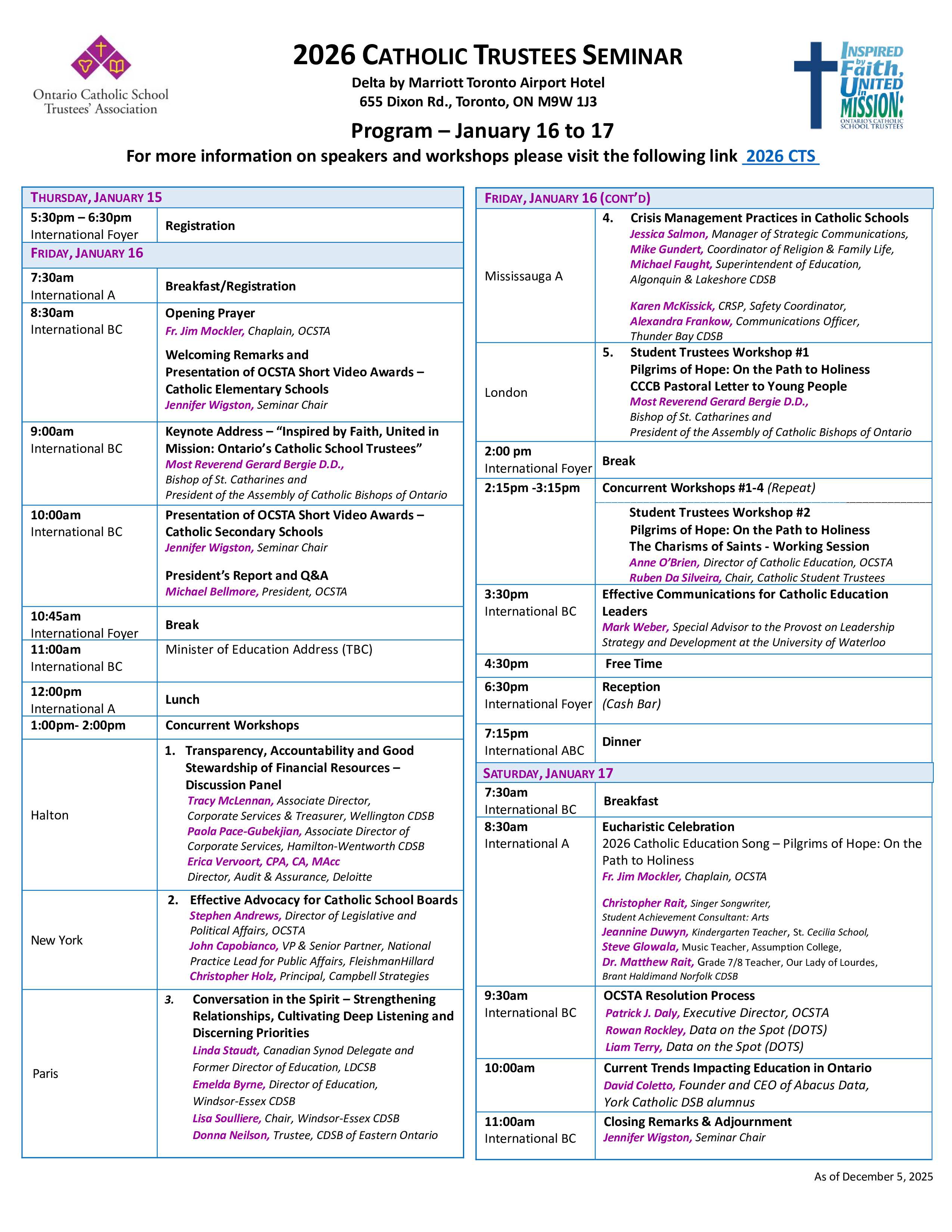
activity

Please note: Some sessions will be recorded.