Set it to true by right-clicking and pressing toggle.
Internet Explorer
On the Tools menu, click Internet Options, then click the Security tab.
Click the Internet Zone.
If you do not have to customize your Internet security settings, click Default Level. Then do step 4.
If you have to customize your Internet security settings, follow these steps:
a. Click Custom Level.
b. In the Security Settings - Internet Zone dialog box, click Enable for Active Scripting in the Scripting section.
Click the Back button to return to the previous page, and then click the Refresh button to run scripts.
Chrome
In the Chrome address bar, type chrome://settings/content/javascript.
Advertised Supporter and Verbal Recognition – Plenary Session
✓
✓
Advertised Supporter - Plenary Session
✓
Advertised Supporter and Verbal Recognition – Gala Dinner
✓
Terms and Conditions
Responsibility for Personal Information D.E. Systems, through its myConferenceSuite Registration System, is responsible for safeguarding personal information under its control. The collection of personal information will be limited to what is necessary for the purpose of registering for the event.
Use of Third Parties When D.E. Systems engages trusted third-party service providers (e.g. for credit card payment processing), appropriate contractual and other measures are implemented to ensure these parties comply with Payment Card Industry (PCI) Data Security Standard Requirements and all applicable privacy laws.
Purpose of Use and Disclosure Personal information will only be used or disclosed for purposes related to the 28th International Technical Conference on the Enhanced Safety of Vehicles (ESV) for which it was collected. Your name, title, organization, and email contact details will be included in the official delegate list, which is accessible to conference attendees and available through the conference mobile application.
Accuracy and Retention D.E. Systems strives to keep personal information accurate, complete, and up to date as necessary for its intended use.
Privacy and Personal Information Policy Information collected is subject to the Personal Information Protection and Electronic Documents Act (PIPEDA) and other applicable privacy legislation. DE Systems’ PCI compliance and security documentation is available upon request. DE Systems reserves the right to amend this documentation at any time.
Photography and Media Notice By attending ESV, you acknowledge that you may be photographed or filmed. These images may appear in publicly available materials produced by the ESV organizing committee or its members.
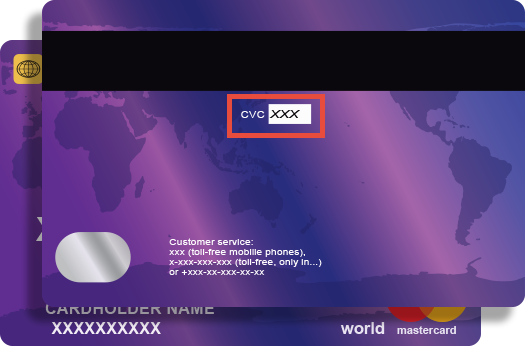
Credit card companies require online transactions be verified by confirming your CVV (Customer Verification Value) number to ensure that you are the true cardholder.
The 3 digit CVV is on the reverse side of your card near the signature panel similar to the picture.
NOTE: If you are using American Express the CVV is a FOUR (4) digit number found on the front of your card in small, black print ABOVE your credit card number.