Continuez à examiner le processus
Copyright© | MYConference Suite Registration | D.E. Systems | All Right Reserved.
Politiques de la section PCMA Canada East
Les annulations seront acceptées uniquement par écrit et doivent être envoyées à l’équipe du Réseautage éclair, dîner et séance de formation de PCMA Canada East à canadaeast@pcma.org. Aucun remboursement ne sera accordé pour les annulations reçues après 17 h 01 (HE), le 21 septembre 2026. Veuillez informer la section PCMA Canada East par écrit de tout changement.
Instructions de paiement
Si vous payez par chèque, veuillez libeller le chèque à l’ordre de PCMA Canada East Chapter et le poster à l’adresse suivante : PO Box 539 - 2140A Queen Street East, Toronto, Ontario, M4E 3V7
Tous les frais sont en dollars canadiens et sont assujettis à la TVH de 5 % (84112-5818-RT0001).
Politique de confidentialité
En participant à la séance de réseautage, dîner et formation, la personne participante autorise la prise de photographies d’elle-même et leur reproduction éventuelle dans les documents officiels de PCMACE.
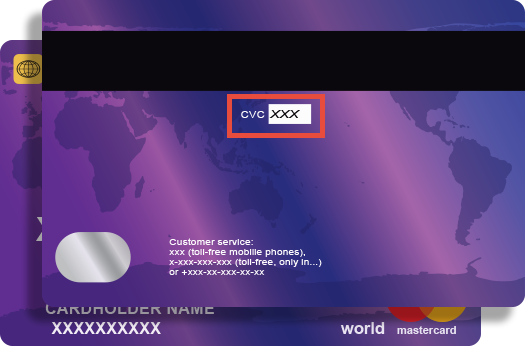
Credit card companies require online transactions be verified by confirming your CVV (Customer Verification Value) number to ensure that you are the true cardholder.
The 3 digit CVV is on the reverse side of your card near the signature panel similar to the picture.
NOTE:
If you are using American Express the CVV is a FOUR (4) digit number found on the front of your card in small, black print ABOVE your credit card number.