Please Continue to Review Process
Canadian Surgery Forum (CSF)
Terms and Conditions
D.E. Systems' myConferenceSuite Registration System is responsible for personal information under its control. Collection of personal information by myConferenceSuite will be limited to what is necessary for the purposes of registration for the event.
When we use trusted third parties to act on our behalf by performing such functions as processing credit card payments, contractual or other appropriate means are used to ensure compliance by such third parties with this Policy and all applicable privacy laws.
Personal information will not be used or disclosed for purposes other than those for which it was collected, to process the registration data to a given event.
We will keep your personal information as accurate, complete and up-to-date as necessary for the purposes for which it is to be used.
The Policy is subject to PIPEDA and/or any other applicable privacy laws and myConferenceSuite reserves the right to change it at any time.
General Liability and Photography/Video Waiver
As a condition of my participation in this meeting or event, I hereby waive any claim I may have against the Canadian Surgery Forum (CSF) and its societies, officers, directors, employees, vendors, agents, or against the presenters or speakers, for reliance on any information presented and release the CSF from and against any and all liability for damage or injury that may arise from my participation or attendance at the program. I further understand and agree that all property rights in the material presented, including common law copyright, are expressly reserved to the presenter or speaker or to the CSF. I acknowledge that participation in CSF events and activities brings some risk and I do hereby assume responsibility for my own well-being.
The CSF intends to take photographs and video of this event for use in CSF news and promotional material, in print, electronic and other media, including the CSF website. By participating in this event, I grant the CSF the right to use any image, photograph, voice or likeness, without limitation, in its promotional materials and publicity efforts without compensation. All media become the property of the CSF. Media may be displayed, distributed or used by the CSF for any purpose.
Privacy Policy
The Canadian Surgery Forum (CSF) adheres to the Canadian Association of General Surgeons’ (CAGS) Privacy Policy when collecting personal information from CSF delegates. As such, the CSF is informing delegates that their personal information will not be shared or sold for any purposes and exclusively used for conference related communications from the office of the Canadian Association of General Surgeons (CAGS).
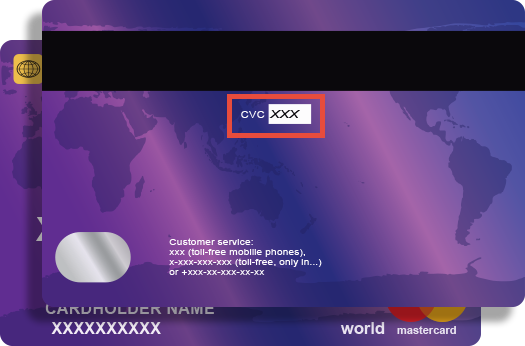
Credit card companies require online transactions be verified by confirming your CVV (Customer Verification Value) number to ensure that you are the true cardholder.
The 3 digit CVV is on the reverse side of your card near the signature panel similar to the picture.
NOTE:
If you are using American Express the CVV is a FOUR (4) digit number found on the front of your card in small, black print ABOVE your credit card number.
Cancellation Policy
Until Friday, September 4, 2026
A 50% refund and a 50% credit will be processed within 30 days of the request. The 50% credit will apply towards a CSF 2027 registration fee and cannot be exchanged for cash or any other form of payment. The credit cannot be transferred to another registrant or any other year.
After Friday, September 4, 2026
All registration and course fees are non-refundable. Substitutions may be made at no additional cost.